
How to Use Market, Limit, Stop-Loss, and Take-Profit Orders? A Complete Order-Types Guide
Choose the wrong order type and a good idea can turn into a bad fill price. Four order types, each prioritizing one thing.


1. Market Order: Prioritizes Speed
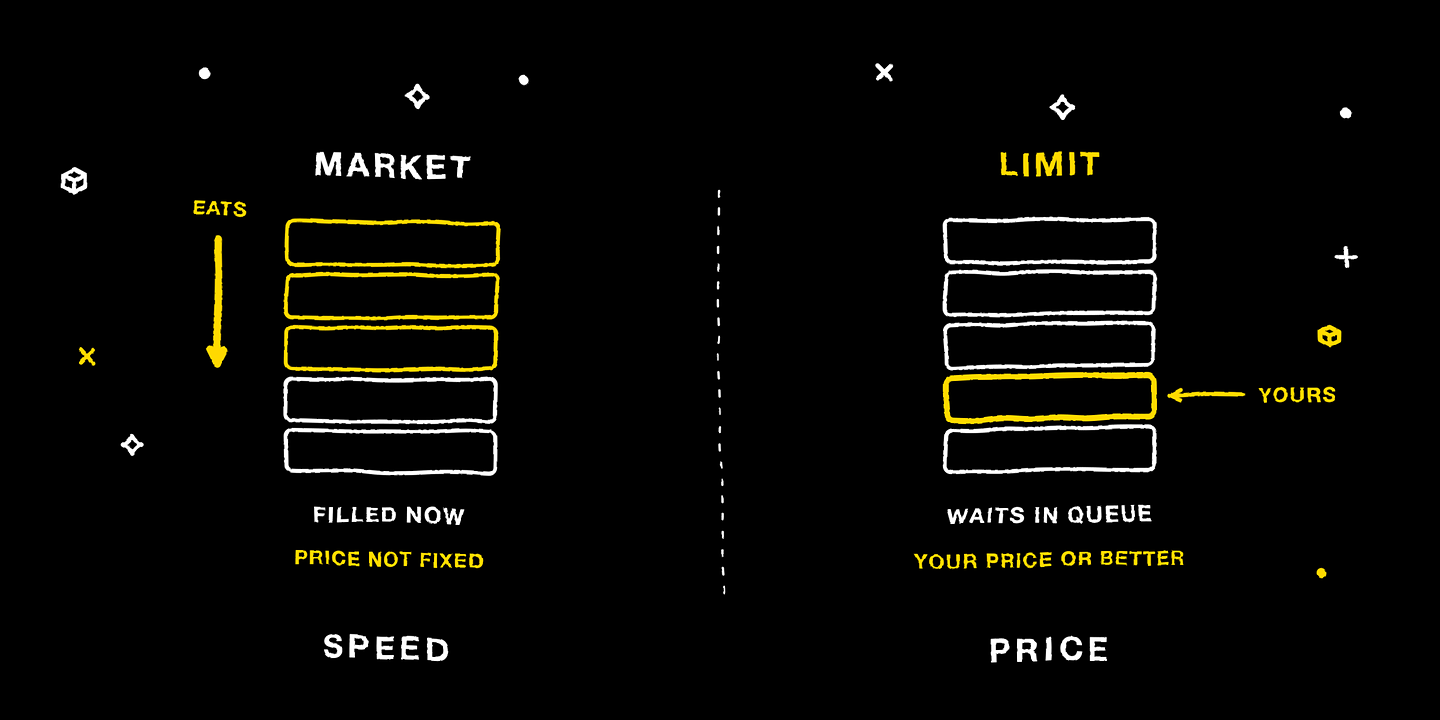
A market order's instruction is “fill immediately, at the best current market price” — it guarantees you'll fill, but not the fill price. It's like hailing a taxi on the street: you get in now, and the fare runs on the meter. It suits sudden market moves where you need to enter or exit immediately, or when liquidity is ample and pricing is competitive. Note: in poor liquidity, a large market order can “eat through” the order book and fill at progressively worse prices.
2. Limit Order: Prioritizes Price
A limit order is a price floor you set: when buying, the highest price you're willing to pay; when selling, the lowest price you're willing to accept, filling only at that price or better — otherwise it queues on the order book. It's like agreeing a fare with a reserved car: I'll only ride in one that doesn't exceed this price. It suits when you've locked in a specific price, want to rule out an unexpected fill price, or are placing a large order and don't want to move the market. The cost: if the price never reaches it, you miss the move.
Platform protection rules: when going long, the limit price cannot be below the current best ask; when going short, it cannot be above the best bid; and when a limit price deviates more than 3% from the best price, the system warns you and only submits after confirmation.
3. Stop-Loss Order: Prioritizes Risk Control
A stop-loss order is a conditional order: when the price hits the “admit-a-mistake level” you preset, it automatically triggers and closes the position to exit. It's the single most important risk-control tool in leveraged trading — especially when you can't watch the market. Understand one key point: it guarantees the trigger, not the fill price. In a sharp gap, the actual fill price may be worse than the trigger price.
4. Take-Profit Order: Prioritizes Locking In Gains
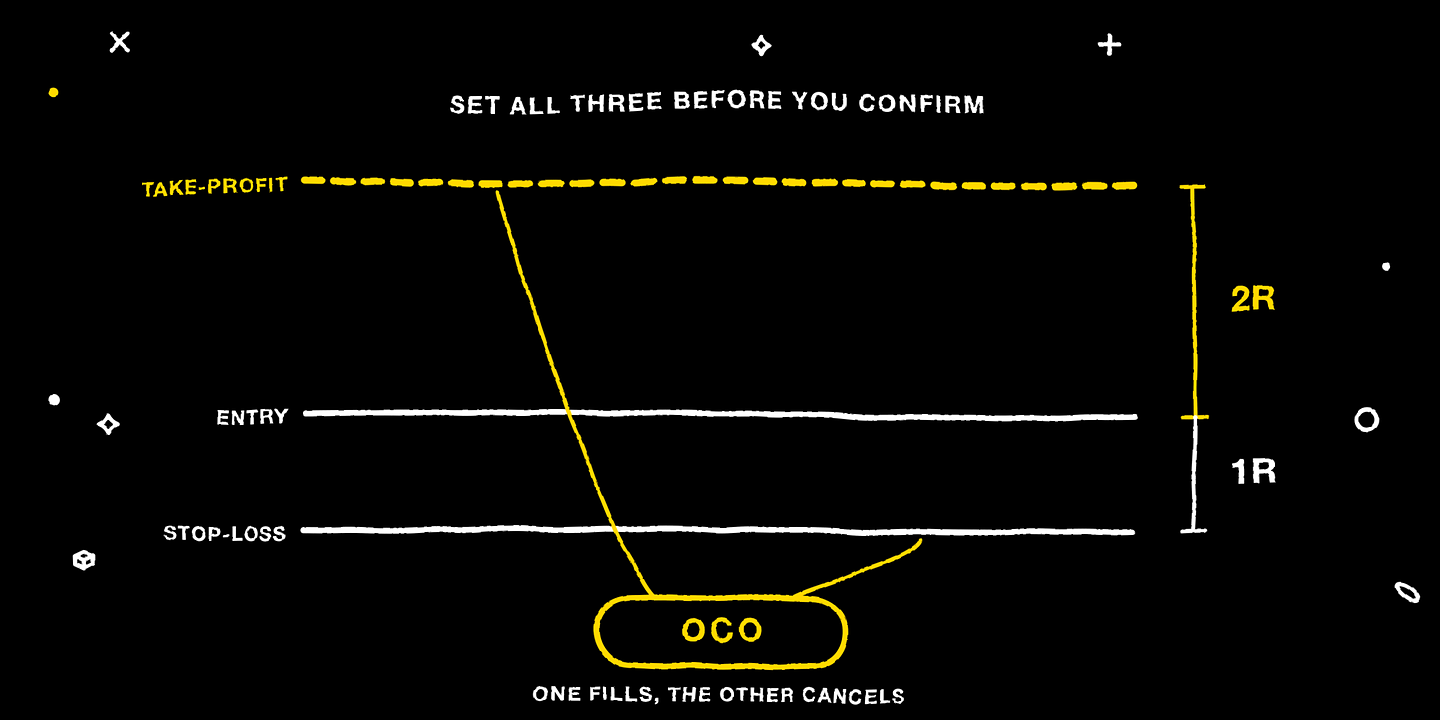
A take-profit order is the mirror of a stop-loss: when the price reaches your target, it automatically closes the position for a profit, handing “when to stop” over to discipline set in advance. A common practice is to set the stop-loss and take-profit together at a risk-reward ratio of at least 1:2, forming an OCO order — when one fills, the other is automatically canceled, so you don't have to cancel it manually.
5. Trigger Basis: Mark Price, Not the Last Traded Price
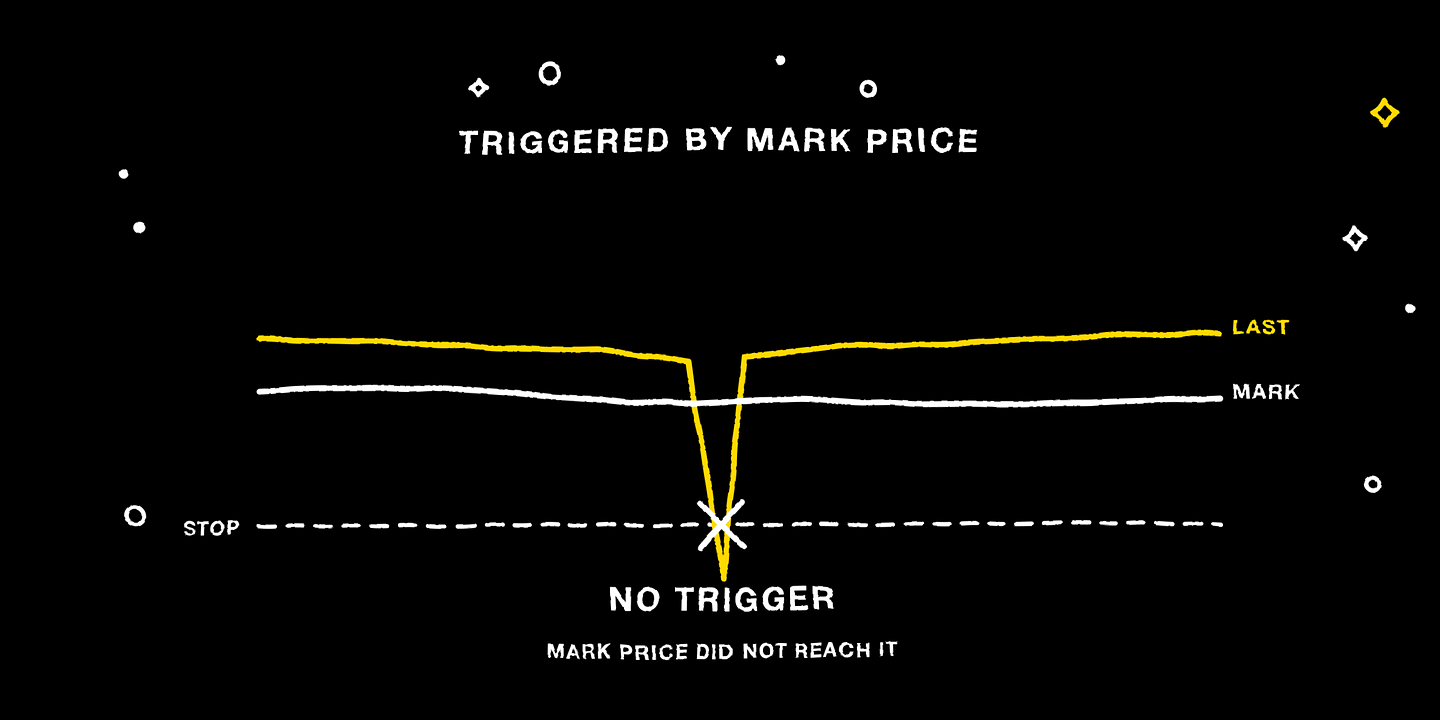
MC Markets' stop-loss and take-profit trigger on the Mark Price. If the last price hits your level but the mark price doesn't, the order won't trigger — this is by design, to prevent a single abnormal trade from falsely triggering your order. For what the mark price is, see “Why Doesn't the Fill Price Match What You Expected?”
6. Slippage Protection
When a market order or stop-loss triggers during a sharp move, the actual fill price can deviate noticeably from the quote you saw. Slippage protection lets you set a maximum acceptable deviation — beyond it, execution is rejected rather than filling at an out-of-control price. Platform defaults: 8% for a regular close, 10% for take-profit/stop-loss orders, adjustable tighter in the order settings. The tighter you set it, the stronger the protection, but the higher the chance of a rejected order in a sharp move.
7. What a Disciplined Trade Looks Like
Enter with a limit order (or a market order when timing matters most) + immediately place a stop-loss after opening (loss no more than 1% to 2% of the account) + set the take-profit at a level with a risk-reward ratio of at least 1:2. All three prices are clear before you tap confirm — it's the plan executing the trade, and you're just supervising it.
FAQ
Q: Why didn't my stop-loss trigger even though the last price hit my stop price?
A: Because the trigger basis is the mark price. A last price pushed by a single abnormal trade won't falsely trigger your order — this is protecting you.
Q: Will a stop-loss always fill at the price I set?
A: Not necessarily. It guarantees the trigger to exit, not the fill price — in a sharp gap it may be worse than the trigger price.
Quick Recap
Market orders secure speed, limit orders secure price, stop-loss orders secure risk control, and take-profit orders secure locking in gains. Triggers are based on the mark price. Slippage protection defaults to 8% for regular and 10% for take-profit/stop-loss. Set your entry, stop-loss, and take-profit prices before confirming — let the plan execute the trade.
Further Reading
What Is Liquidation? Understanding MC Markets' Liquidation Mechanics and Margin Calls
How Are MC Markets' Fees Calculated? A Full Rate Table for Standard, Advanced, and VIP Discounts
Disclaimer
This article is for general informational and educational purposes only and may not apply to the regulations or products available in your region. It does not constitute investment, financial, or trading advice of any kind, nor an offer, solicitation, or recommendation to buy, sell, or hold any digital asset.
Trading digital assets involves high risk, prices can be extremely volatile, and you may lose all of your invested capital. Leveraged trading can result in losses exceeding your initial deposit. Past performance is not indicative of, and does not guarantee, future results.
You should make investment decisions independently based on your own financial situation and risk tolerance, and consult a licensed professional adviser where necessary. While we strive to ensure the accuracy of the information in this article, MC Markets accepts no liability for any errors or omissions, or for any loss you may suffer from using or relying on this information.
No more